Free Online RAW Photo Editor
Develop RAW photos in your browser, with exposure, color and tone controls and a photo library. This is an open-source alternative to Lightroom that runs on your device: free, no sign-up, and your photos are not uploaded. The browser version is experimental, so keep your originals.
Prefer an installed app? Download the free desktop app
- Open your browser developer tools and switch to the Network tab
- Open a file in the editor
- Your file never appears as an upload request
Best on a desktop browser. This editor has desktop menus and shortcuts.
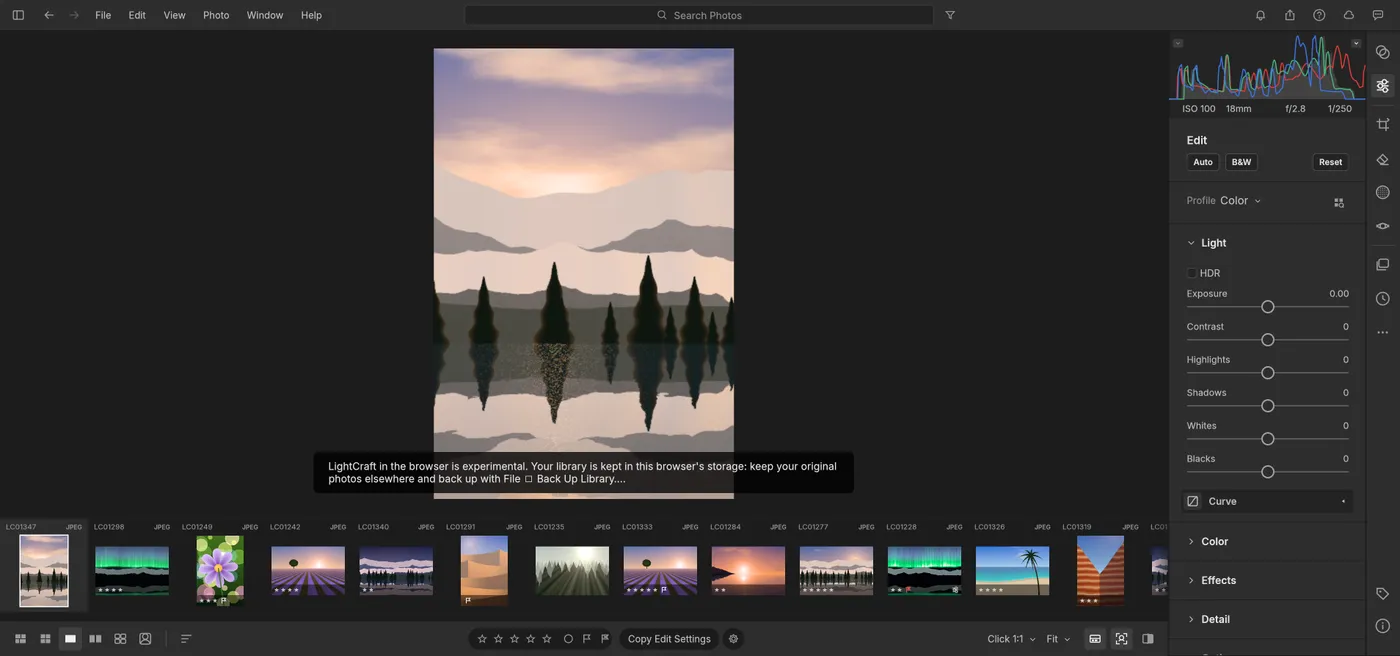
Engine start screen, captured 2026-10-12
Formats it opens
What the engine's own documentation lists. Our own tests are in the compatibility table below.
| Format | Listed by the engine | Tested by us |
|---|---|---|
| .dng | DNG is listed as supported | Not tested yet |
| .cr2 | Canon CR2 is listed as supported | Not tested yet |
| .cr3 | Canon CR3 is listed, with some variants not decoded yet | Not tested yet |
| .arw | Sony ARW is listed as supported | Not tested yet |
| .nef | Nikon NEF is listed; Nikon high-efficiency NEF is not decoded yet | Not tested yet |
| .raf | Fujifilm RAF is listed (Bayer and X-Trans) | Not tested yet |
| .rw2 | Panasonic RW2 is listed | Not tested yet |
| .pef | Pentax PEF is listed | Not tested yet |
| .orf | Olympus ORF is listed; compressed ORF is not decoded yet | Not tested yet |
What you can do
- Develop RAW files with exposure, tone, color and detail controls
- Watch a live histogram while you adjust
- Import photos into a library
- Back up the library from the File menu
- Export developed photos
Compatibility
| Check | Result | Notes |
|---|---|---|
| Editor starts | Works | Loaded with WebGPU and a sample photo library |
| Adjust exposure | Works | Dragging the slider to +2.81 changed the main image and the histogram live |
| Import a RAW file | Not tested yet | We have not run an open test for this format yet |
| Export a developed photo | Not tested yet | We have not run an open test for this format yet |
| Phone screen (390 px wide) | Partial | The adjustment panel shows, but the main image is pushed out |
Known issues
- The browser version is experimental. Your library is kept in your browser's storage for this site, and browsers can clear that storage. Keep your original photos elsewhere and use File, Back Up Library.
- The first start downloads about 18 MB (estimated from compressed file sizes), mostly a Chinese interface font.
- Some camera variants are not decoded yet: other CR3 variants, compressed ORF and SRW files, and Nikon high-efficiency NEF.
- The editor is built for a desktop keyboard and mouse. It is cramped on a phone.
When to keep the original software
Keep using the desktop software for large catalogs, tethered shooting, or camera models and RAW variants this editor cannot decode yet.
FAQ
Can it open a .cr2 file?
Is my photo library safe?
Are my photos uploaded?
Does it edit non-RAW photos?
Runs the open-source LightCraft engine v0.6.0 (24.6 MiB) · MIT / Apache-2.0 · Last tested 2026-10-12 · source · license